Organise desk cables for reliable audio
Reduce strain and make the signal path visible.
The short answer
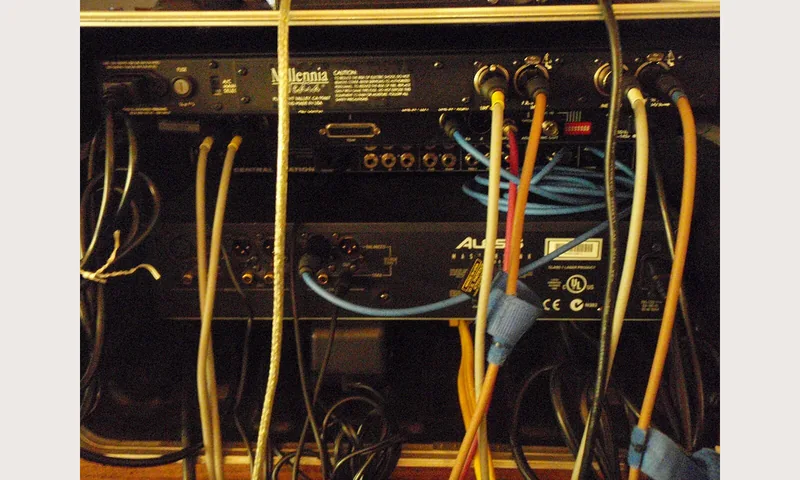
A tidy desk is useful when you can trace a fault without unplugging everything. Plan service loops and accessible connectors rather than hiding every cable permanently.
What to do
- Label both ends of similar cables and separate signal cables from power bricks where practical.
- Secure cables with reusable ties without crushing them. Leave movement room for monitor arms, chairs and microphone booms.
- Test every device after sleep and after moving adjustable furniture through its normal range.
Label the signal paths
Trace each lead from source to destination before bundling anything. Label both ends where several similar cables meet a hub or interface. Separate the audio path from charging and network cables in your notes. This makes a future dropout easier to diagnose and prevents unplugging a working device simply because a cable disappears behind the desk.
Leave connectors free from strain
Allow enough slack for chair movement, microphone arms and normal device access. Secure bundles to fixed supports rather than hanging their weight from a small socket. Avoid tight bends, pinching and stretched headphone leads. Keep power adapters ventilated and walking routes clear. Never modify mains wiring or remove protective earth to solve an audio problem.
Check reliability before hiding the run
Test all devices together and gently move only the sections that normally move. If noise changes near a power supply, try greater separation or a supported balanced connection. Route analogue audio away from interference sources where practical. Save a simple connection diagram and keep frequently accessed plugs reachable so future changes do not require dismantling the whole desk.
Check the result
No cable should pull a connector sideways, cross a walking route or disappear into an untraceable bundle.
Know the limits
Do not tightly coil excess mains cable under a heavy load or trap power supplies where ventilation is restricted. Follow equipment instructions for safe power distribution.
Further reading
Sources for the connections and technical principles discussed above. The diagnostic sequences are our editorial explanation. Consult the manual for your exact model before changing hardware or settings.
These are general educational guides, not hands-on product reviews. How we prepare our content. Cover photo source & license.
Keep working on your setup
Choose wired or wireless gaming audio
Separate convenience from latency, microphone quality and compatibility.
Read the guide
Stop game audio leaking into voice chat
Find out whether the leak is acoustic or electronic.
Read the guide
Route audio to a capture card cleanly
Choose one intentional path for each source and monitor return.
Read the guide